Photo guide
How to identify a tree from a photo
Seven shots that carry the clues botanists ask for, the light and distance that keep them sharp, and four checks for when the name you get looks wrong.
In short
To identify a tree from a photo, take several photos rather than one: the whole tree, a leaf from the top and the underside, how the leaves attach to the twig, the buds, the bark at chest height and any fruit or cones, with a coin or ruler for scale. Shoot in soft light and fill the frame. Then check the suggested name against the features a photo can't show.
- Photograph the leaf underside as well as the top: its color and hairs often separate close relatives.
- Put a coin, a pen or a ruler in the leaf and fruit shots, so size is readable.
- When a result looks wrong, photograph a different part of the tree instead of retaking the same leaf.
You can identify most trees from photos if the photos carry the clues a botanist would look for. One close-up of a single leaf rarely does. The New York Botanical Garden's plant information service, which identifies thousands of plants a year from the public's pictures, asks for a set of views: the plant from a distance, leaves from the top and the underside, how the leaves sit on the stem, and the bark, buds, twigs and fruit. This guide turns that into a shot list that works with any phone and any app, then explains what to do when the name you get looks wrong.
The shot list: seven photos that identify a tree
Take these in order, at the tree. Each one answers a question a field key will ask.
| Shot | What it shows | Why it matters |
|---|---|---|
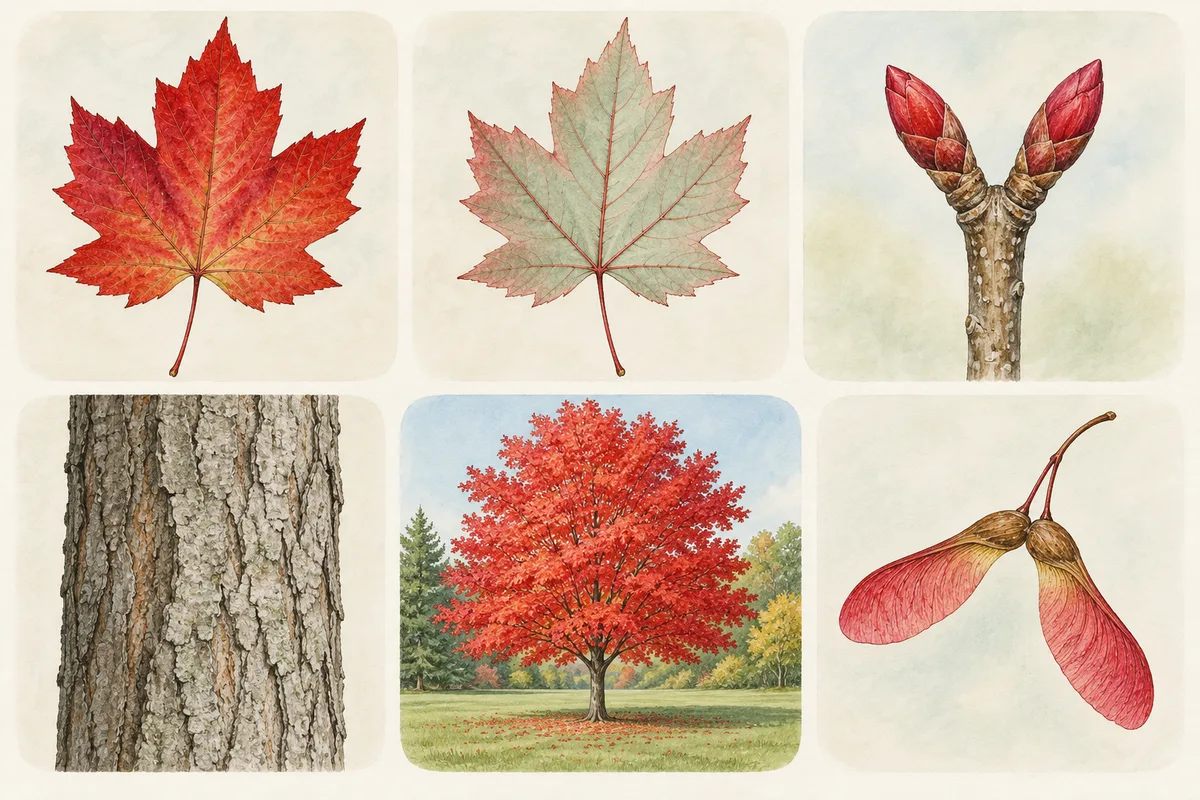
| 1. Whole tree | Crown shape, trunk, site | Separates a spreading open-grown tree from a narrow one; shows wet or dry ground |
| 2. Leaf, top side | Outline, edge, tip, lobes, veins | The first thing any key or app reads |
| 3. Leaf, underside | Color, hairs, vein pattern | Often separates close relatives |
| 4. Leaves on the twig | Opposite or alternate, simple or compound | Halves the list of candidates |
| 5. Twig end with buds | Bud shape, color, scales, leaf scars | The main clue from leaf fall to spring |
| 6. Bark at chest height | Ridges, plates, peeling, lenticels | Confirms a candidate |
| 7. Fruit, seeds, cones or flowers | Acorns, samaras, nuts, cones, petals | Often the strongest single clue |
Add a scale reference to shots 2, 3 and 7. The NYBG guide suggests a person, a coin or a ruler in the frame; E-Flora BC at the University of British Columbia notes that size is sometimes a key character in its own right, and that a pen works when you have no ruler.
Why the underside earns its own shot: E-Flora asks whether the underside is green or whitish, because that is one of the features its reviewers use to separate species. A red maple leaf, for example, is green above and "whitened and sometimes glaucous or hairy beneath", according to the Virginia Tech Dendrology fact sheet. A photo of the top alone throws that clue away.
Shot 4 matters for the same reason. E-Flora points out that most plants have alternate leaves and only a few have opposite ones, so a photo that shows opposite leaves resolves an identification quickly. In eastern North America, a tree with opposite leaves is almost always a maple, ash, dogwood or buckeye; the hub guide to identifying trees explains that shortcut.
How to take photos that stay sharp
The NYBG guide lists the problems it sees most in the photos it receives, and each has a simple fix:
- Blur. The background is in focus and the leaf isn't. Tap the leaf on your screen to focus on it before you shoot.
- Too far away. A tree that looks small in the frame turns to pixels when you zoom in later. Walk closer instead of zooming, and let the leaf, bark patch or fruit nearly fill the frame.
- Harsh light. Pictures taken in bright sunshine often look washed out. Shoot on a cloudy day, early in the morning or late in the afternoon, and avoid flash at night.
- Tangled plants. A vine or a neighboring shrub growing through the tree confuses everyone. Gently pull it aside so only the tree you're asking about is in the shot.
- Missing context. Write down where the tree is (a yard, a park, a forest edge), the date, and anything a photo can't record, such as a smell when you crush a leaf or a scratch a twig.
Both NYBG and E-Flora also ask for a wide shot of the site, because a tree growing in a boggy hollow and one on a dry slope can be different species with similar leaves.
Photos by season
What you can photograph changes through the year, so adjust the list:
- Spring and summer. Leaves are the main clue. Pick a leaf from a sunlit branch of a mature tree, not a shaded sprout at the base of the trunk, which may not look typical. Flowers are a bonus.
- Fall. Fruit and seeds are at their best: acorns, paired maple wings, hickory husks, cones. Fallen leaves under the tree count too, if you're sure they came from that tree.
- Winter. Photograph the twig end with its buds, a leaf scar, the bark and anything still hanging in the crown. University of New Hampshire Extension calls this "the three B's": branching, buds and bark. Look on the ground for last year's leaves. The winter tree identification guide has a bud key for common eastern trees.
Run the photos through an app or a key
With your set of photos, you have three routes, and you can use more than one:
- A photo app. On an iPhone, Apple's Visual Look Up in Photos and Google Lens in the Google app both suggest names for plants in a picture; the iPhone guide gives the exact taps for each. Dedicated plant and tree apps do the same.
- A community. On iNaturalist, other users review your photos. An observation reaches "Research Grade" when more than two-thirds of identifiers agree on a species, according to iNaturalist's help pages, so a single confident guess isn't enough.
- A key or field guide. Your notes on leaf arrangement, leaf type, buds and fruit are exactly what a dichotomous key asks for.
Tree Identifier is one way to do the first route. It's an iPhone app (it also runs on iPad in iPhone layout; there's no Android version) that reads one photo per identification: the whole tree, a leaf, the bark, a flower or a fruit. It sends the photo to a cloud AI model, so it needs an internet connection. The result shows the common and scientific names, the origin, growing conditions and key traits. It shows no confidence score and no list of alternative species, so pick the most telling photo from your set, usually a clear leaf or the fruit, and treat the answer as a lead to check. The follow-up chat under each result lets you ask how the species differs from a look-alike you have in mind.
When the result looks wrong
A name that doesn't fit the tree in front of you is common, and it usually means the photo carried the wrong clue. Work through these four checks:
- Photograph a different part. If a leaf gave a doubtful answer, try the fruit, the buds or the bark. A different clue is worth more than a second shot of the same leaf.
- Check every feature against the tree. Does the suggested species have opposite or alternate leaves? Is its leaf underside whitish or green? Are its buds clustered at the twig tip? If one feature contradicts what you see, the name is wrong or the photo was atypical.
- Look up the look-alikes yourself. Open a regional field guide or your state extension service's tree pages and read how the suggested species differs from its close relatives. Oaks, for example, hybridize, and no photo settles a hybrid.
- Ask a person. Ask Extension sends questions to Cooperative Extension and university staff and volunteers in participating land-grant institutions, and your county extension office is another route. Botanical gardens run plant information services, like the NYBG one quoted above. Herbaria keep reference specimens and the botanists who know them: the New York Botanical Garden's Index Herbariorum lists 4,035 active herbaria worldwide as of December 31, 2025, with their staff and areas of expertise, searchable by state and city.
When you ask a person, send the whole set of photos as attachments, not pasted into the body of an email. NYBG notes that embedded images can't be zoomed, which hides the details they need. Add the location, the date and anything you noticed that the photos don't show.
For a closer look at how often photo apps get trees right, and why bark is harder than leaves, read how accurate tree identification apps are.
Keep a record of the trees you identify
Once you have a name, keep the photos with the place and date. You'll want them in another season: a tree identified from its leaves in July can be checked against its fruit in October and its buds in January. Tree Identifier keeps a History of past identifications, and if you allow location, its Tree Map pins each find so you can walk back to the same tree. A notebook with the photo numbers works just as well. Either way, a second season's evidence is the best confirmation a photo identification can get.
What a photo can't settle
- A photo can't show smell, sap or the inside of a twig. A broken black birch twig smells of wintergreen and a cut black walnut twig has a chambered pith; you have to be at the tree to check either.
- Planted cultivars, hybrids and grafted trees often look unlike the wild species, and no photo will tell you the cultivar name on the nursery tag.
- Tree Identifier reads one photo per identification and shows no confidence score or list of look-alikes, so a doubtful result needs a second photo and your own check.
Questions people ask
Can you identify a tree from a picture?
Usually, if the pictures show the right parts. One leaf on its own often isn't enough. A set of photos showing the whole tree, both sides of a leaf, the twig and buds, the bark and any fruit gives a photo app or an expert most of what a field key asks for.
What kind of tree is this, from just one photo?
One photo can give you a likely name, not a certain one. Treat it as a lead: check the leaf arrangement, the leaf underside, the buds and the fruit on the tree itself, and take a second photo of a different part if anything doesn't match.
Is there a free app that tells you what tree is in a picture?
Several are free to use or free to download. On iPhone, Apple's Visual Look Up in Photos and Google Lens in the Google app both suggest names for plants in a photo. Tree Identifier is free to download with optional in-app purchases. Whatever you use, confirm the name with the field checks on this page.
Why does a tree app give a different answer for each photo?
Each photo shows different clues. A shade leaf, a sprout from the trunk or a young tree's bark can look unlike the textbook form, so two photos of the same tree can point two ways. Photograph a typical sunlit leaf, the buds and the fruit, and trust the name that fits all of them.
Who can confirm a tree identification for free?
Your county's Cooperative Extension office is the usual first stop in the US; Ask Extension forwards questions to Extension staff and volunteers. Botanical gardens such as the New York Botanical Garden run plant information services, and Index Herbariorum lists herbarium botanists by state and city.
Sources
- Photographing Plants for Identification — New York Botanical Garden, LuEsther T. Mertz Library
- E-Flora BC Photography Tips — E-Flora BC, University of British Columbia
- Red maple fact sheet — Virginia Tech Dendrology
- Mind Your B's to Identify Winter Trees — University of New Hampshire Extension
- What is the Data Quality Assessment and how do observations qualify to become Research Grade? — iNaturalist Help
- Ask Extension — Extension Foundation
- Index Herbariorum — New York Botanical Garden, William & Lynda Steere Herbarium